
Daily kennel care: feeding, checks, and tasks done the same way every day
Daily work and handoffs, written down once.
Feeding, daily records, tasks and reminders that the whole team can see, on desktop or mobile.
The problem
Handoffs between shifts depend on someone remembering to pass something on. Small things slip.
A morning routine
- 1
Open today’s checklist.
- 2
Log feeding for each room in bulk.
- 3
Note anything unusual on the daily record.
- 4
Leave a task for the afternoon team.
In the product
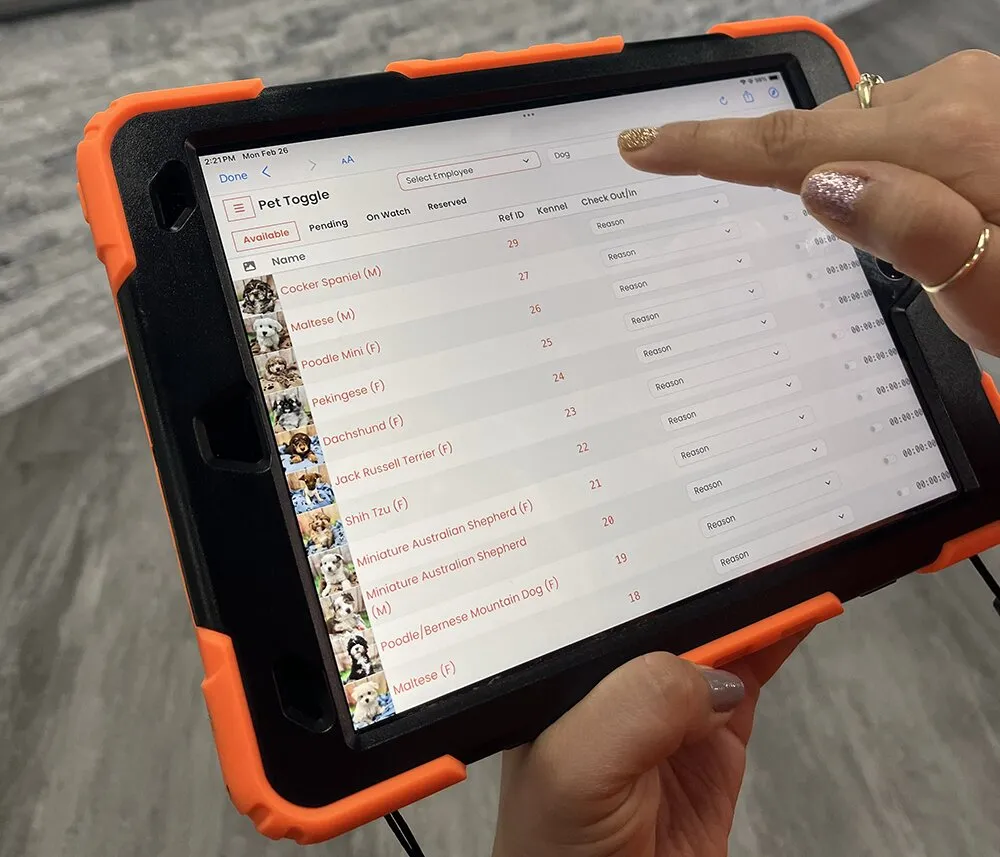
Pet Toggle at the kennel.
Pet Toggle runs on dedicated tablets next to the kennels, one for each exit or entrance, and records every time a pet enters or exits the kennel.
Stores can lock a tablet to UKM with iOS Guided Access, so a check-in and check-out tablet stays on Pet Toggle.
What this covers
- Daily Records
- Bulk Feeding Operations
- Checklists and Task Management
- Automated Reminders
- Scheduling
- Waitlist Management
- Check-In/Out System
- Staff and Role Setup
- Mobile Access
Clear boundaries
Scheduling and check-in features originated in kennel and boarding workflows; we confirm fit for yours.
Volunteer scheduling is not claimed.
Who uses this
Related features
Questions
Does UKM work on phones?
Mobile access is part of UKM. We confirm current device details in a demo.
Can boarding or grooming businesses use UKM?
UKM’s scheduling, waitlist and check-in tools come from kennel workflows. Contact us to discuss your business.
Next step
See how UKM could fit your organization.
Tell us about your daily work. We will show the parts of UKM that match it and be clear about anything that does not.