
The short answer
- Keep PetXchange or Dog On Web for what they do for your store today.
- Use the Unified KM sync to bring their pets into your records instead of retyping them.
- Use Unified KM for the work that happens after a pet arrives: status, prices, care, health exams, documents and the customer handoff.
What each product describes
PetXchange’s website, thepetxchange.com, describes it as a recordkeeping and compliance application for pet professionals, featuring automated forms such as registry, USDA and OFA forms, online integration with other industry providers, and live support.
Dog On Web’s website describes it as software as a service for the pet industry that manages kennel records, medical records and registrations, USDA forms, e-commerce, a WebSales Portal and business to business electronic records transfers.
Unified KM is cloud based pet management software. The pet record is the center of it, and care, documents and the people involved connect back to that record. For stores that use PetXchange or Dog On Web, Unified KM includes a sync that imports pets from their files. We confirm in a demo how it fits your setup.
Side by side
| Area | Unified KM | PetXchange (as described on its site) | Dog On Web (as described on its site) |
|---|---|---|---|
| Pet records | One record per pet with breed, microchip, ancestry, sire and dam, breeder profile, notes, treatments and documents. | A recordkeeping and compliance application for pet professionals. | Detailed animal records, breeding and litter records, multiple registrations and integrated pedigrees. |
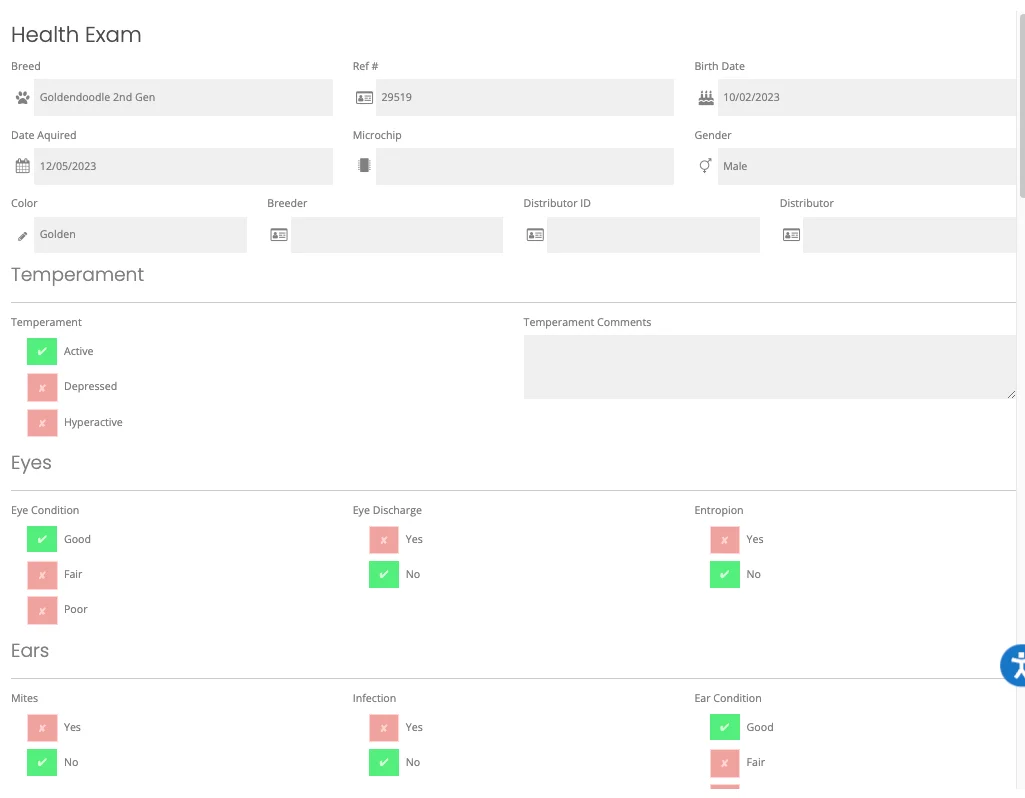
| Health exams | Our help center documents a digital health exam form the veterinarian completes and signs on an iPad, viewable in Pet Counselor and printable. What is available for your workflow today is confirmed in a demo. | OFA forms are listed among its automated forms. | Medical records, vaccinations, medications, medical procedures and medical certifications such as OFA, OFEL and CERF. Health certificates are listed among its forms. |
| Documents and signatures | A Documents tab on each pet, public or private per file, digital document signing and editable warranty documents. | Automated forms, including registry, USDA and OFA forms. | Document management and 40+ automated forms, including USDA and registry forms. |
| Multi-location reporting | Reporting tools, dashboards and multi-location support. Exact views are confirmed in a demo. | Not described. | Multi-user support with role based security. Multiple locations are not described. |
| Customer-facing listing | Pet status and price show on the available pets page of your website. Which website platforms work with it is confirmed in a demo. | Not described. | A WebSales Portal for web based sales, with one click listings. |
| Connections | Imports pets from PetXchange and Dog On Web files through the Sync screen in UKM Admin. | Online integration with other industry providers. | Business to business electronic records transfers and online integration with major registries. |
| Support | support@unifiedkm.com, 484-704-2525, the support portal, and a dedicated Zoho Cliq channel for each customer. | Live, knowledgeable and courteous support. | Contact by email, online form, telephone, fax or mail. |
How they work together
Here is how a pet moves from PetXchange or Dog On Web into daily work in Unified KM:
The file appears in UKM Admin
Under Unified KM, then Sync, the Available Files table lists each file with its source, file name, number of pets and total cost.
You review the pets
In Preview you check breed, microchip, sex, color, prices, status, name, acquired date and photo, then accept or decline each pet. Every pet needs a price, a name, an acquired date and a photo to import.
Pets become records
Importing creates or updates a record for each pet, and a summary shows what was imported, updated, unchanged or had errors.
Your team takes it from there
Staff set sizes and add-ons, move pets to Coming Soon before the vet exam, record treatments and the exam, and work the sale in Pet Counselor.
The full walkthrough is on PetXchange and Dog On Web sync.
What Unified KM replaces
When a pet’s information lives on a cage card, a spreadsheet and a folder, staff spend time hunting and the record drifts out of date. Unified KM replaces those with one record per pet that its three main portals read from:
- UKM Admin, for managers and owners on a computer: pets, reports, bulk edits, prices, treatments, breeder details and users.
- Pet Counselor, on in-store tablets: search inventory, review prices, breeder and sire and dam details, open documents and complete the sale.
- Pet Toggle, on tablets next to the kennels: records each time a pet enters or leaves its kennel.
Past Dog On Web records
Unified KM can also perform a data transfer from Dog On Web, much like the transfer for PetKey. To do it, the Unified KM team needs your store’s Dog On Web username and password. What moves is confirmed with you during onboarding.
What Unified KM does not do
- It is not a place to find or buy pets.
- It stores microchip and breed registration details, but registry submissions are not claimed.
- USDA, OFA and health certificate form automation is not claimed on this site. Keep the tool you use for those today.
- It is not a full point of sale, payment or accounting system.
- It records care but does not give medical advice or schedules.
Questions
Do I need both PetXchange and Unified KM?
If PetXchange is part of how your store works today, yes. Unified KM imports the pet data from your PetXchange files and handles the store records that come after.
Does the sync work with Dog On Web too?
Yes. The same Sync screen in UKM Admin imports pets from PetXchange and Dog On Web files.
Can Unified KM fill out USDA or registry forms?
We do not claim USDA form automation or registry submissions on this site. Unified KM stores microchip and registration details on each pet record. Keep the tool you use for those forms today.
Can I stop using spreadsheets?
That is what Unified KM is for. Pet records, status, prices, treatments, health exams and documents all live on one record per pet. Whether an existing spreadsheet can be brought in directly, and in what format, is confirmed during onboarding.
What does Unified KM cost?
We do not publish current pricing. Scope and terms are confirmed in writing after we talk through your organization. See Pricing.
Using PetXchange or Dog On Web today? Request a demo and we will show how their pets come into Unified KM and what your team does next.
Sources
- thepetXchange home page, accessed November 3, 2026
- DogOnWeb home page, accessed November 3, 2026
- DogOnWeb services, accessed November 3, 2026
- About DogOnWeb.com, accessed November 3, 2026