
Why a written checklist matters in a pet store
Most pet stores run on routines that live in people’s heads. The opening manager knows which room gets fed first, the evening associate knows which puppy needs a note for the morning, and the part time weekend staff learn by watching. That works until someone is out sick, a new hire starts, or a busy Saturday pushes a task past closing.
Handoffs between shifts are where small things slip. A written checklist does three jobs at once: it tells staff what to do, it records that the work happened, and it shows the next person what is still open. When the checklist sits next to the animal records instead of on a clipboard, it also connects each task to the animals it affects.
One boundary is worth stating up front. A checklist records that routine work was done. It does not decide what care an animal needs. Feeding plans, treatments and anything clinical come from your veterinarian and the licensed professionals you work with. Your checklist is how the team carries out and records those instructions consistently.
Before you write anything: map one real day
The fastest way to build a checklist people will finish is to start from what your team already does, not from a template. Spend one normal day writing down the work as it happens.
Walk the store in order
List every room, kennel bank, intake area and supply area. Note the order your team moves through them, because the checklist should follow the same path.
Group tasks by time of day
Opening, mid day, afternoon and closing are usually enough. Several short lists are easier to finish than one long one.
Separate room tasks from animal tasks
“Feed Room A” applies to a group. “Note that this puppy left food behind” applies to one animal. Keeping them apart makes recording faster, and it matches how UKM handles bulk feeding for groups and daily records for each animal.
Assign each task to a role
Write “opening associate” or “kennel lead” rather than a person’s name. Roles survive schedule changes; names do not.
Define what done means
“Clean intake area” is vague. “Intake area cleaned and surfaces wiped down with your approved product” is something two people will do the same way.
What to put on a pet store daily care checklist
Every store is different, so treat the groups below as a starting point to adapt. Keep the wording short and specific, and remove anything your team does not actually do.
Opening
- Walk every room and confirm the animals present match the records.
- Read the notes and open tasks left by the previous shift.
- Record anything unusual you notice on that animal’s daily record.
- Check that the tablets used on the floor are charged and signed in.
Feeding
- Log feeding for each room once it is done, following your current feeding plan.
- Note any animal whose feeding differed from the plan, so the next shift sees it.
- Restock food and supplies that are running low, and update the count.
Cleaning and environment
- Clean kennels and the intake area according to your sanitation routine.
- Record cleaning by room, at the times your routine calls for.
Care and observations
- Record treatments that were given, as instructed by your veterinarian.
- Write down observations in plain language on the animal’s daily record.
- Send anything concerning to the person responsible for contacting your veterinarian.
Animals moving in and out of kennels
- Record each time an animal leaves or returns to its kennel, with the reason.
- Confirm every animal is back in its kennel before closing.
Records and paperwork
- Create records for new arrivals and check breed, microchip and source details.
- Set puppies due for a veterinary exam to Coming Soon the night before the exam.
- Confirm sizes are set before a puppy is published, since size drives required add-ons and the final price.
Closing
- Leave a handoff note for the next shift.
- Create tasks or reminders for anything that is still open.
Keep each list short
A list nobody finishes is worse than no list, because it trains people to skip items. If a time block has more than about a dozen items, split it by room or by role. Review the lists after the first two weeks and cut anything that is always skipped or always done without being written down.
How Unified KM supports the daily routine
Daily operations in UKM bring checklists, feeding, daily records, tasks and reminders into the same place as the animal records, on desktop or mobile. The parts that matter most for a checklist routine are:
- Checklists and task management so each shift works from the same list and can see what is open.
- Bulk feeding operations so a whole room can be logged at once instead of animal by animal.
- Daily records on each animal, for observations that need to travel with that animal.
- Automated reminders for follow ups the next shift should not miss.
- Staff and role setup so people see what their job requires.
- A check in and check out system for animals leaving and returning to their kennels.
A typical morning in UKM looks like this: open today’s checklist, log feeding for each room in bulk, note anything unusual on the daily record, and leave a task for the afternoon team.
We will show the current checklist setup options for your store in a demo.
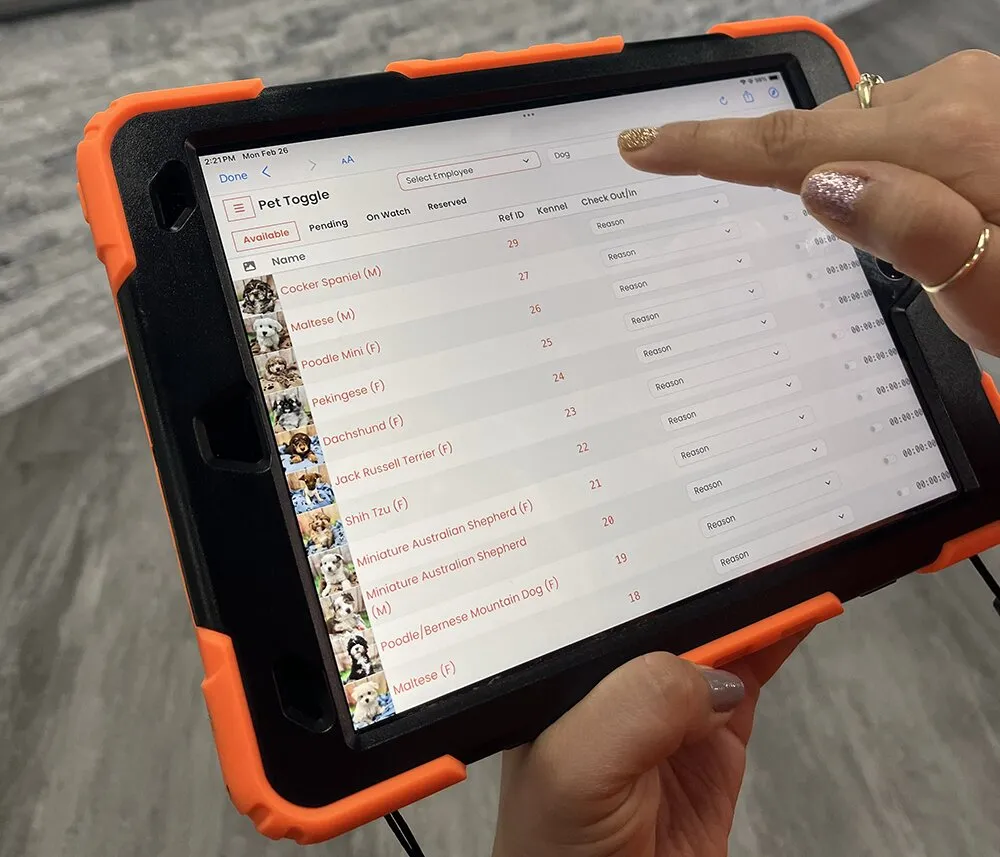
Pet Toggle at the kennel door
Pet Toggle is the UKM view designed for dedicated tablets placed next to the kennels, ideally one at each kennel entrance or exit. It records every time a pet enters or exits the kennel. That covers the “animals moving in and out” part of your checklist without a separate paper log.
Pet Counselor and Admin
Pet Counselor is the view for counselors on in-store tablets. It is where staff search the animals in the store, review prices, breeder information, sire and dam details and documents, and complete the final sales process. Admin is for managers, general managers and owners, and is meant for a computer browser rather than a tablet. Bulk editing, prices, users and reports are handled in Admin.
Setting up the floor tablets
Checklists only get finished when the device is where the work happens. When your store is set up, UKM emails the access details with the web addresses for Pet Counselor, Pet Toggle and Admin. A simple tablet setup looks like this:
Open the right view in Safari
Open the Pet Toggle or Pet Counselor address from the access email in Safari on the tablet.
Add it to the Home Screen
Use Safari’s “Add to Home Screen” option so staff can open the view with one tap.
Lock the tablet to UKM
On an iPad, Guided Access (Settings, then Accessibility, then Guided Access) keeps the tablet on UKM. This works well for the check in and check out tablets at kennel entrances.
Place one tablet per kennel door
Put a Pet Toggle tablet at each kennel entrance or exit so recording happens at the moment the animal moves.
Review the checklist every week
A checklist is a living document. Once a week, the store manager should look at what was missed, which items caused questions, and which notes kept repeating. Rewrite the items that were unclear and retrain on anything that keeps slipping.
Owners with more than one store can use UKM’s reports and dashboards to understand activity across one or several sites. If you run several locations, start with the same core checklist everywhere and add store specific items only where the building or team truly differs.
Common mistakes to avoid
- One list for the whole day. Split by time of day and by role.
- Tasks with no owner. Every item needs a role responsible for it.
- Recording in two places. If staff fill in paper and the system, one of them will drift. Pick one.
- Clinical decisions on the checklist. Keep care instructions with your veterinarian; the checklist records that they were followed.
- Never updating the list. When you change a room, a supplier or a routine, change the checklist the same week.
Local rules come first
States and cities can set their own care and recordkeeping rules for pet stores. Check with your licensing authority which records you must keep, in what form, and for how long. This guide does not cover any specific state’s requirements.
Frequently asked questions
Can staff complete checklists on a tablet or phone?
Mobile access is part of UKM, and the Pet Counselor and Pet Toggle views are designed for in-store tablets. We confirm current device details for your team in a demo.
Can we log feeding for a whole room at once?
Yes. Bulk feeding operations let you record feeding for a group of animals together instead of one at a time.
How does the next shift know what happened?
Checklists, daily records, tasks and reminders are visible to the team, so the next shift can see what was done and what is still open.
Can we track when a puppy leaves its kennel?
Yes. Pet Toggle runs on tablets next to the kennels and records every time a pet enters or exits the kennel.
Does UKM tell us what care an animal needs?
No. UKM records care information. Care decisions, schedules and treatment guidance remain the responsibility of licensed professionals.
Related pages
Want to see checklists, bulk feeding and Pet Toggle with your own routine in mind? Request a demo and bring your current list.