
A note on acceptance
This guide is not legal or veterinary advice. Requirements for puppy health records differ by state and sometimes by city, and they change. Ask your veterinarian and your licensing authority which form, fields and retention period apply to you, and use this guide to make sure the record you keep is complete and easy to read.
What makes an exam record easy to rely on
Veterinarians, store staff and customers read the same exam record for different reasons. The veterinarian wants to see that the findings are recorded as they were made. Staff want to know whether a puppy is ready to be listed. Customers want paperwork that clearly belongs to their puppy. A clear record serves all three.
- It identifies the animal beyond doubt. Breed, sex, color, birth date, microchip number and your internal reference number, so the record cannot be confused with a littermate.
- It shows where the animal came from. The date acquired and the breeder or distributor.
- It records findings section by section. Each body area has a defined set of answers instead of free text only, so two exams can be compared.
- It leaves room for comments. The veterinarian can explain anything a checkbox cannot.
- It is signed and dated. The veterinarian’s signature and the exam date are on the record itself.
- It is stored with the animal. Anyone who needs the exam later finds it on that animal’s record, not in a binder.
- It can be printed. A clean printed copy is ready for the customer’s paperwork or for an inspection.
The sections on the UKM digital health exam
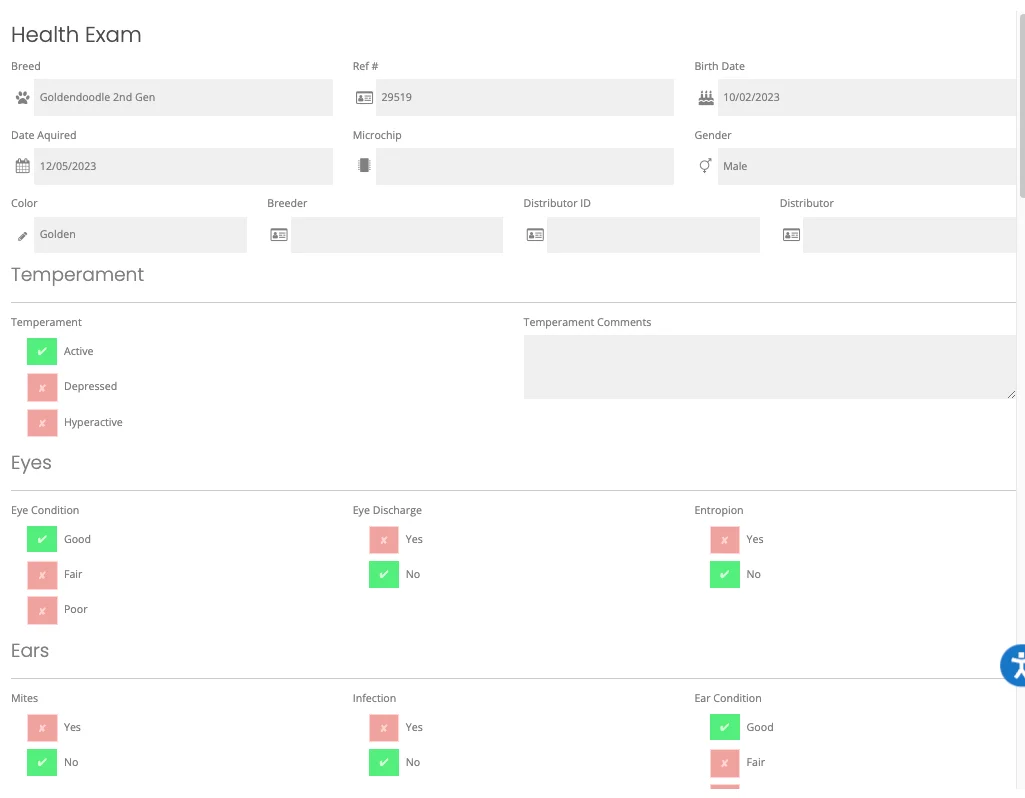
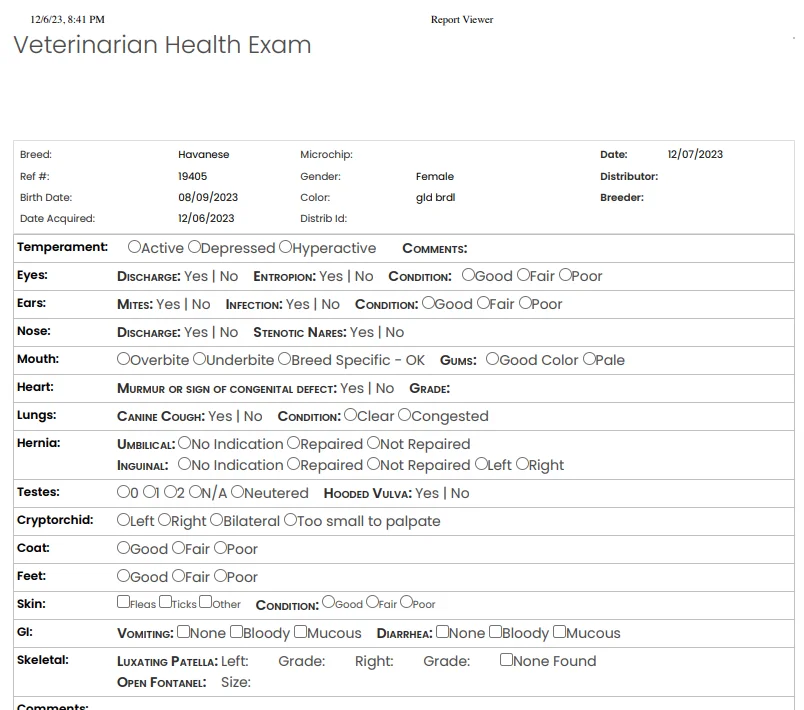
The UKM digital health exam form starts with the animal’s identifying details and then moves through the exam section by section, with checkboxes or fields in each section and a comments area. The table below lists the sections and the kinds of items shown on the form in our product captures. It describes the form, not what a veterinarian should look for.
| Section | Items shown on the form |
|---|---|
| Identification | Breed, reference number, birth date, date acquired, microchip, gender, color, breeder, distributor and distributor ID |
| Temperament | Active, depressed or hyperactive, plus temperament comments |
| Eyes | Discharge, entropion, and eye condition (good, fair or poor) |
| Ears | Mites, infection, and ear condition |
| Nose | Discharge and stenotic nares |
| Mouth | Overbite, underbite or breed specific, and gum color |
| Heart | Murmur or sign of congenital defect, with grade |
| Lungs | Canine cough and lung condition |
| Hernia | Umbilical and inguinal, with repaired or not repaired |
| Testes and cryptorchid | Testes (0, 1, 2, N/A or neutered), hooded vulva, and cryptorchid (left, right, bilateral or too small to palpate) |
| Coat, feet and skin | Condition for each, and fleas, ticks or other for skin |
| GI | Vomiting and diarrhea |
| Skeletal | Luxating patella (left and right, with grade) and open fontanel size |
| Comments, signature, date | Free text comments, the veterinarian’s signature and the exam date |
How the digital exam works in UKM
The steps below follow our help center article on the digital health exam (December 2023). We confirm what is available for your workflow during a demo.
The veterinarian gets a UKM user profile
The veterinarian needs a UKM user profile to complete and sign the digital exam.
The store prepares the puppies
The exam is performed for puppies in Pending or Coming Soon status. The typical flow is to set the puppies due for an exam to Coming Soon the night before.
The exam is completed on an iPad
The veterinarian works through each section using the checkboxes and fields, and adds comments where needed.
The veterinarian signs and submits
The veterinarian signs on the iPad and submits the exam.
The completed exam is on the record
The completed exam, with its sections, statuses, comments, signature and date, is viewable in Pet Counselor and can be printed.
Preparing for exam day
Most incomplete exam records start before the veterinarian arrives. A short preparation routine helps.
- Confirm each puppy’s record has breed, sex, color, birth date, date acquired and microchip number filled in and checked against the paperwork.
- Make sure breeder and distributor details are on the record.
- Set the puppies due for an exam to Coming Soon the night before, then clear caches and check the available pets page.
- Give the veterinarian a list of the puppies to be examined, by name and reference number.
- Have the exam iPad charged, signed in and ready.
- If a kennel technician assists, agree beforehand who handles the puppies and who enters the findings.
After the exam
- Open each completed exam in Pet Counselor and check that it is signed and dated.
- Look for blank sections and ask the veterinarian about them while the visit is fresh.
- Print copies for the customer paperwork that will go home with the puppy, if your process includes it.
- Record vaccines and dewormings as treatments. Treatments are set up in Treatment Settings and can be added in bulk.
- Upload any other documents from the visit to the puppy’s Documents tab (PDF, DOC, DOCX, JPG or PNG) and set each one to public or private.
If your veterinarian uses their own form
Some veterinarians prefer their own clinic form. The completed form can be stored on the puppy’s Documents tab, so it still sits with the record. Whether a digital signature meets a requirement for a specific document is for you and your advisors to decide.
Gaps that make an exam record hard to rely on
- A microchip number that is missing or does not match the chip paperwork.
- An exam with no date, or a date that does not match the visit.
- A record that is not signed.
- Sections left blank with no comment explaining why.
- A paper form scanned at an angle or filed under the wrong puppy.
- Several copies of the same exam in different places, with different details.
What UKM does not do
UKM records care. It is not a veterinary practice management or electronic medical record system, and it does not provide medical advice, diagnostics, prescriptions or lab connections. Clinical decisions remain with licensed professionals. UKM also does not decide whether a record satisfies a legal or regulatory requirement.
Frequently asked questions
Will my state accept the UKM digital health exam?
We cannot say. Requirements vary by state and change over time. Ask your veterinarian and your licensing authority what applies to you. UKM’s role is to keep a clear, signed and dated record with the animal.
Does the veterinarian need a UKM account?
Yes. The veterinarian needs a UKM user profile to complete and sign the digital exam.
Can we print the completed exam?
Yes. The completed exam, including sections, statuses, comments, signature and date, can be viewed in Pet Counselor and printed.
Which puppies can be examined with the digital form?
The exam is performed for puppies in Pending or Coming Soon status.
Does UKM decide whether a puppy is healthy?
No. UKM records what the veterinarian finds and signs. Clinical decisions remain the responsibility of licensed professionals.
Related pages
Want to walk through an exam day with your veterinarian’s workflow in mind? Request a demo and bring the form you use today.